
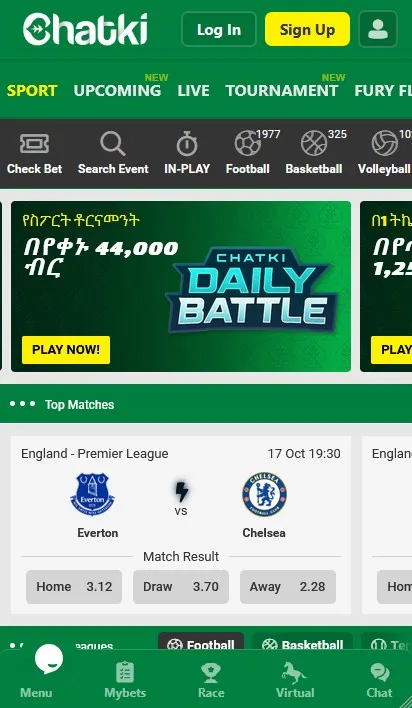
The Chatki app question has a simple answer: the product is designed to run in a browser, and there is no native iOS build. Android users may find an official download, but the mobile site is the safest starting point.
Table of Contents10 sections
What the Chatki app offers
The Chatki app, when offered, mirrors the mobile website. You get sports filters, a betslip, the cashier, and account controls in one shell. The core products do not change because the icon sits on your home screen.
A native app can save a login step and send notifications. It can also create another update path and another place to store credentials. Weigh that convenience against the simpler browser route.
Chatki Ethiopia mobile users should test the browser first. If the lobby, cashier, and withdrawal pages work, an install is optional rather than essential.
Chatki app download for Android
Start on the official site and look for the mobile or download section. A Chatki app download for Android should come from that domain, not from a random file host. Check the package name and the publisher before you tap install.
The Chatki app download APK route may require you to allow installs from your browser. That permission is powerful. Turn it off again after the install, and never keep it on for everyday browsing.
If the site offers no file, do not hunt for a mirror. Use the browser version instead. A missing download link is safer than an unofficial copy with unknown code.
Latest version and updates
The Chatki app download for Android latest version is whatever the operator publishes on its own download page. Version numbers in blog posts age quickly. Compare the file date and publisher, not a screenshot of a version screen.
Updates can change permissions, cashier flows, or login behaviour. Read the change note before you install. If an update asks for a new permission that has nothing to do with betting, stop.
Automatic updates are convenient but remove your review step. Manual updates cost a few seconds and keep you aware of what changed. Choose the habit that matches your risk tolerance.
Chatki Ethiopia mobile browser access
Open chatki.bet in Chrome, Safari, or another current browser. The lobby should fit the screen without horizontal scrolling. If buttons overlap or text clips, the browser is probably outdated.
Chatki Ethiopia mobile access does not need an app store account. That matters when storage is tight or the store is unavailable. Add the page to your home screen if you want a one-tap shortcut.
Browser updates also deliver security fixes. Keep the browser current, and avoid modified builds from unofficial sources. A clean browser is part of your account security.
Installing the web app
Open the site, then use your browser's add-to-home-screen command. The label varies by browser, but the result is a shortcut that opens the mobile lobby. It is not a native iOS app.
A shortcut can cache the icon and some page assets. It does not guarantee offline betting, and it does not replace your login. Treat it as a bookmark with a better icon.
On iOS, the share menu holds the add-to-home-screen action. On Android Chrome, the three-dot menu offers the same choice. If the option is missing, open the site directly and skip the shortcut.
If the shortcut opens a blank page, remove it and add it again from the current site. A stale shortcut can point to an old address after a platform change.
Data use and performance
Live odds and streaming graphics use more data than a text page. A stable connection matters more than a fast one for bet confirmation. Avoid placing a final slip on a weak signal.
Close unused tabs before a live session. Background apps can steal memory and make the lobby feel slow. If the page stutters, reduce animations in your browser settings.
The Chatki bet app download may promise faster loading, but the difference depends on the build. Measure your own experience before you keep a second copy of the product. Battery use also rises during live video, so keep a charger nearby for long sessions.
Security on mobile
Lock your phone and use a screen lock that others cannot guess. Keep the betting account password out of notes and chat apps. A password manager is safer than a screenshot.
Download from the official domain only. A Chatki bet app download from a forum or Telegram group is a red flag. Malicious builds can capture credentials or payment details.
Log out on shared devices and review active sessions. If you lose your phone, change the password from another device and contact support. Speed matters more than pride after a loss.
Troubleshooting
Most mobile problems are cache, connection, or version issues. Clear the browser cache, check the signal, and update the app if you installed one. Try a private window to isolate the cause.
If the cashier fails but the lobby works, the issue may be the payment provider. Do not retry a deposit until you know whether the first attempt is pending. Support can see the status.
| Problem | First check | Next step |
|---|---|---|
| Page will not load | Signal and browser version | Try another network or browser |
| Login loops | Cookies and clock settings | Clear the site data once |
| Install blocked | Unknown-source permission | Use the browser instead |
| Slow live odds | Open tabs and memory | Close apps and retry |
Conclusion
The browser is the safest default for Chatki on mobile. It avoids unknown files, updates automatically, and covers every product. An official Android build can add convenience, but it is not required.
Test a small deposit and a small withdrawal before you rely on any route. If the app or browser behaves unpredictably, stop and use support. Access should feel simple, not risky.
Chatki FAQ
Is there a Chatki app for iPhone?
No native iOS app was offered during our review. iPhone users should open the mobile site in Safari and add it to the home screen.
Where is the official Chatki app download?
Use the download link on the official chatki.bet domain. Our Android button opens the operator route in a new tab.
Do I need the app to place a bet?
No. The browser version covers the lobby, betslip, cashier, and account settings. An app is optional.
Is the APK safe to install?
Only if it comes from the operator and matches the published details. Scan the file and remove the install permission afterwards.
Why does the mobile site feel slow?
Live odds and weak signal are common causes. Close unused tabs, update the browser, and retry on a stable connection.